
Transforming Your Memories: Can You Digitize Your Own Tapes?
Introduction: Preserving the Past in the Digital Age
Did you know that according to recent studies, over 60% of households still have VHS tapes tucked away somewhere?
It’s a testament to the enduring allure of nostalgia that these relics of the past continue to hold a special place in our hearts. But as technology marches ever forward, the risk of losing these precious memories to the ravages of time looms larger. But the question is, Can You Digitize Your Own Tapes?
That’s where the magic of digital conversion comes in. By digitizing your old VHS tapes, Hi8 or films you not only preserve your cherished memories for future generations but also unlock a world of possibilities for sharing and reliving those moments.
In this comprehensive guide, we’ll explore the various methods for converting VHS to digital, weigh the cost and considerations. So dust off those old tapes and get ready to embark on a journey to digitize your memories!
Transforming Your Memories: A Beginner’s Guide to Converting VHS to Digital
Diving into the Digital World
Hey there, fellow nostalgia aficionados! Remember those good ol’ VHS, Hi8 or films gathering dust in your somewhere is your house? Well, it’s time to bring them back to life in the digital age! In this guide, we’ll walk you through everything you need to know about converting your cherished tapes to digital formats.
Methods for Converting VHS to Digital
1. Connect to a Computer
If you’re a tech-savvy DIY enthusiast, this method might be right up your alley. Simply dust off that old VCR or camcorder, connect it to your computer using a special gadget, and voila! You’re ready to start digitizing. Here is piece of equipment that you can purchase to digitize your tapes.
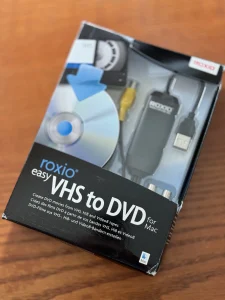
2. Use a DVD Recorder
Do you prefer to have that tangible item? Opt for a DVD recorder. Simply insert your VHS tape, press record, and watch as your memories are transferred onto a shiny new DVD. This can become costly if you only have a few tapes that you need to transfer. Below is an example of a VHS-to-DVD recorder. Or, you could also contact us to have your tapes digitized.LINK
3. Record from Screen
Got screen-capture software handy? If you’re tech-savvy, you can record your VHS tape as it plays on your computer screen using software like OBS. This software is free and not too difficult to figure out. You could always find a tutorial on YouTube.
4. Hire a Professional Service
Short on time or technical know-how? No worries! There are plenty of professional services out there that specialize in VHS-to-digital conversion. If only there was a company that specialized in this service. You could search for “convert VHS to digital near me” and let the experts do the heavy lifting.
Cost Considerations
Professional services typically range from $8 to $30 per VHS transfer, with additional charges for copies. DIY options, on the other hand, might require a small investment in equipment or software. You can find our pricing list on our tape transfer page if you’re interested.
Legal Matters: Disney VHS Tapes
Before you start converting, it’s important to note that converting copyrighted content like Disney VHS tapes is usually prohibited due to copyright restrictions. So, unfortunately, those childhood classics might have to stay on the shelf.
Conclusion
And there you have it! With these tips and tricks, you’ll be well on your way to preserving your precious memories for years to come. So dust off those VHS tapes, fire up your computer, and let the digitizing begin! Yes, you can digitize your own tapes. But sometimes it’s more convenient to hire a professional.
Remember, whether you choose to DIY or enlist the help of professionals like us, converting your VHS tapes to digital is a surefire way to ensure that your memories stand the test of time.

