
How to Get Aerial Photos of Your House Quickly
If you want aerial photos of your house fast, follow these steps:
Open Google Earth Pro and enter your home address.
Turn on historical imagery to view older aerial photos.
Check your county GIS mapping portal for recent high-resolution orthophotos.
Search United States Geological Survey EarthExplorer for NAIP imagery downloads.
Use sites like HistoricAerials or Esri Wayback for year-by-year imagery.
If you need higher resolution photos, hire a Part 107 licensed drone photographer.
You can get free tools like Google Earth, USGS imagery, and county GIS maps provide historical and satellite views, while professional drone photography delivers the highest-resolution aerial images for marketing, inspections, and property documentation.
Finding aerial photos of my house is easier than you might think. With the right sources, you can get useful results in minutes. This article lays out the quickest, highest-value options so you can pick between current orthophotos, historic aerial imagery, or commercial high-resolution shots and explains where to download NAIP imagery, pull satellite views, and when to switch to paid viewers for year-by-year detail.
Quick summary
Start with trusted hubs. Use Google Earth, your county GIS, USGS/NAIP, and HistoricAerials for fast previews; most of these viewers let you browse at no cost and offer basic downloads. That usually gives the context you need before paying for higher‐resolution or licensed images.
Use precise coordinates. Convert your address to latitude/longitude or pull the parcel center from the assessor so searches land on the same spot across platforms. Consistent coordinates make it easy to compare dates and resolutions without mis‐centering on large tiles.
Where to find aerial photos of my house
For free, nationwide orthoimagery start with USGS tools. Use USGS EarthExplorer to filter by date and download GeoTIFFs; registration is required but access is comprehensive. The USGS National Map provides NAIP imagery at roughly 1‐meter resolution across most states and makes bulk downloads straightforward for mapping and planning work. For a concise technical reference to NAIP data formats and access tips, see this NAIP guide.
If a visual timeline matters, check HistoricAerials, Esri Wayback, or Google Earth Pro. These viewers let you scrub year‐by‐year orthophotos and see change over time with sliders or side‐by‐side comparisons. They work well for restoration research, property disputes, or tracking development on your parcel. For pricing and single‐image options, review HistoricAerials pricing, and for Esri’s vintage imagery viewer see Esri Wayback.
Finally, look at your county GIS portal and state geoportals for the highest‐resolution, most recent files. County portals often host sub‐meter orthophotos and downloadable tiles; OpenAerialMap can fill coverage gaps. If national archives lack the date or resolution you need, search your county’s GIS site or the state’s portal index for focused results.
| Source | Best For | Cost | Resolution |
|---|---|---|---|
| Google Earth | Quick satellite view | Free | Medium |
| USGS NAIP | Mapping & downloads | Free | ~1 meter |
| County GIS | Recent local imagery | Free | Sub-foot in many areas |
| HistoricAerials | Historical photos | Paid for downloads | Varies |
| Professional Drone Photography | High-resolution marketing images | Paid | 5–15 cm |
How to search by address or coordinates across the top viewers
Use precise coordinates so searches land on the same spot every time. Convert an address to lat/long in Google Maps or your county parcel viewer, or copy the parcel center/APN coordinates from the assessor site to avoid mis‐centering on large rural tiles.
On USGS EarthExplorer paste the lat/long into the search box, choose orthoimagery or the NAIP dataset, set a tight date range, and run the search. Registration is required for GeoTIFF downloads, and you should always check image metadata for resolution, projection, and capture date before requesting large files. That helps confirm whether the image meets your measurement or mapping needs.
HistoricAerials accepts an address and lets you scrub a year slider to preview vintages; free previews often include watermarks, so note the year and footprint before buying. In Google Earth Pro enable historical imagery, paste coordinates to center the view, and use the time slider for context. Esri Wayback offers side‐by‐side World Imagery vintages for quick visual comparisons of recent changes.
Create a repeatable search routine: paste coordinates, use the same date window, and record projection and resolution from the metadata. Save footprints or screenshots with filenames that include the date and source so you can compare images accurately later.
How to download or buy the best image for your needs
Choose the right file and purchase option to avoid surprises when you need an aerial image for measurement, printing, or web use. Pick a GeoTIFF when you need a georeferenced image for mapping or accurate measurements and choose a high‐resolution JPG or PNG for marketing images or prints. Decide up front whether you need coordinates and reliable scale, or just an attractive shot for a listing.
Understand resolution and orthophoto status before you buy. Resolution is reported as ground sample distance: public ortho collections often run around 1 meter per pixel, many county flights are sub‐foot (6 to 15 cm), and commercial flights or professional drone surveys commonly deliver 5 to 15 cm. Ask the seller whether the file is orthorectified and which projection and datum were used because orthorectified imagery is required for reliable area and roof measurements.
Price varies by source and file type, so match spend to need instead of chasing the cheapest option. Archives like HistoricAerials often offer single JPG downloads for modest fees while full‐resolution GeoTIFFs and archive scans can run from $50 to several hundred dollars. Custom commercial flights or survey‐grade mapping cost more; always request sample metadata and a written license before you purchase.
How to order aerial photos of my house (hire a local drone pro)
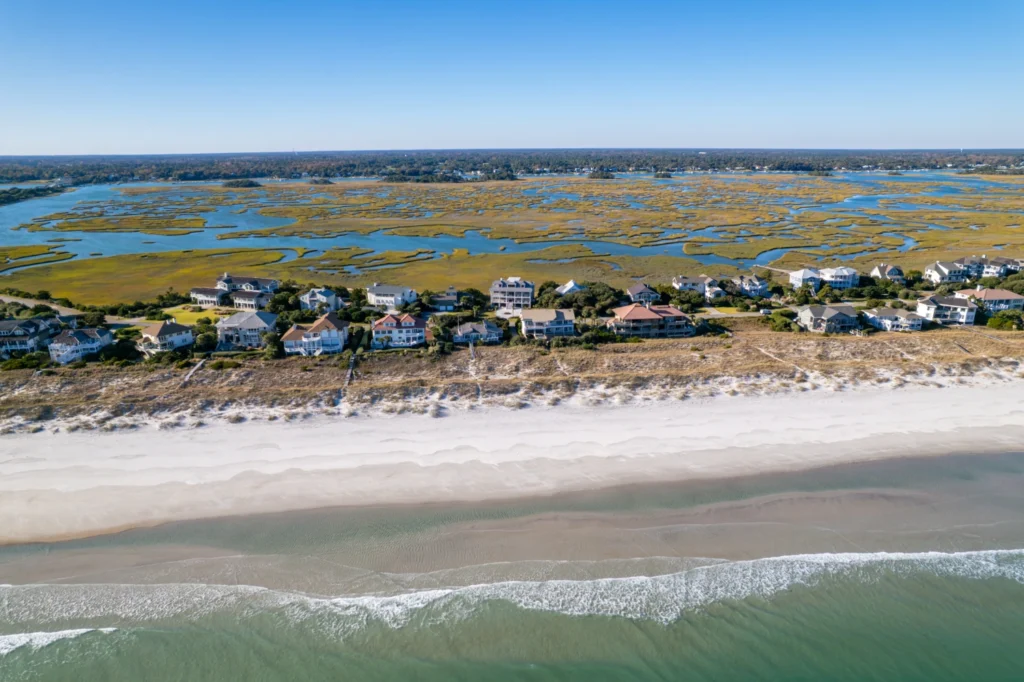
Order new photos when the view or condition of your property has changed. Hire a professional drone shoot for marketing‐grade images, inspection‐level roof detail, or full control over angles and lighting to support listings, inspections, or promotional work. Professionals can also deliver survey‐grade outputs such as orthomosaics when required. For background on how drone work fits into industry trends, see The Evolution of Drone Aerial Photography, Luma 3 Productions.
Write a concise brief so the operator quotes accurately and delivers what you need. Include the property address, required shots (nadir orthophoto, oblique overview), and any desired video clips. Specify altitude and resolution preferences and list final file types: GeoTIFF for mapping, high‐resolution JPGs for print, or RAW for heavy edits. State the intended use—MLS, poster, or mapping—so licensing is clear. For practical shot lists and piloting tips, consult our Drone Photography Guide:Tips, Techniques & Aerial Creativity.
Expect standard safety and scheduling steps from a professional operator. Work with a Part 107 licensed pilot who verifies airspace, files any required LAANC or NOTAM notifications, and carries liability insurance; plan for scheduling lead times of one to seven days depending on weather and season. Typical photo‐only packages run roughly $150 to $500, with higher costs for orthomosaics, survey mapping, added video, or postproduction.
Before the shoot ask for a sample image, a short preflight plan, and an estimated delivery date for edited files and georeferenced imagery. A professional pilot will confirm parking, flight lines, and permissions and include simple usage rights in the contract. Those details keep the session efficient and ensure you receive publish‐ready material.
Licensing, privacy, and legal checks before you publish
Publishing aerial photos responsibly protects you and your neighbors while avoiding legal headaches. Most providers sell a license to use images rather than transferring ownership, so read the license terms before you buy or download. Confirm whether the license covers commercial use, attribution, and redistribution limits.
When reviewing a license check concrete points: does it allow MLS listings, advertising, print reproduction, or social media promotion, and is attribution required? Ask for written clarification or an expanded license if terms are vague. Getting the right license upfront prevents restrictions later when you need to use the images.
Respect privacy and neighbor considerations when publishing aerial imagery of your house. Blur faces and license plates, avoid close‐up shots that reveal private backyard details. Follow local privacy laws and community norms before posting images publicly.
Your pilot should handle FAA registration, preflight airspace checks, and any required waivers or approvals.
Your quick action plan: get an aerial photo in one week
1. Define your goal clearly: do you need historical context, measurement‐grade data, or marketing photos? The answer determines whether you start with archives, buy a GeoTIFF, or hire a drone pilot for MLS‐ready images.
Open Google Earth or the USGS National Map for a quick preview and date checks. These platforms often provide the context you need before committing to a paid download or a drone shoot.
Use HistoricAerials or Esri Wayback to browse year‐by‐year orthophotos, and consult your county GIS portal for current, high‐resolution tiles. If you need measurement accuracy, check whether the portal offers GeoTIFF downloads with projection metadata before buying.
Purchase a GeoTIFF when you need georeferenced imagery for measurements, surveying, or setback calculations. Confirm ground sample distance (GSD), projection, and orthorectification before you download.
If archives lack the date or resolution you need, request a drone quote that lists exact shots, flight altitudes, and desired file types. Ask for sample metadata and a clear license covering your intended uses to avoid surprises.
Before you pay, confirm licensing, permitted uses, and delivery formats so the final files work for MLS, print, or mapping. Keep copies of the license and receipt with the delivered images for future reference.
Budget and timeline depend on the path you choose: a public NAIP download is usually free and takes under an hour, while paid archive downloads often arrive within minutes to a day. A commissioned drone shoot typically schedules within a few days and delivers edited photos in one to seven days depending on retouching and file prep. If you need high‐resolution satellite plates or historic scans expect small fees for specialized archive access or larger formats. For a quick roundup of free satellite imagery options and data sources, see this guide to free satellite imagery sources.
Luma 3 Productions can handle the full workflow if you prefer to hand this off. We’re a family‐run video production company in Wilmington, NC, offering Part 107 certified pilots, and explicit quotes that list shots, licensing, and file types. We deliver MLS‐ready HDR images, call outs of the surrounding area, and quick turnaround options. Book a short consult and we’ll recommend the most cost‐effective path for your address and intended use. Read our case study on how aerial drone photography improves real estate listings, The Impact of Aerial Drone Photography in Today’s Real Estate Market, Luma 3 Productions, for examples of how aerials improve listings and inspections.
Get aerial photos of my house today
Take one clear step now: convert your address into lat/long with a free coordinate tool, drop those coordinates into Google Earth and your county GIS, and save the best dated image you find. That covers most DIY needs quickly. If you want fresh MLS‐ready aerials or a licensed commercial image, book a Part 107 drone session and receive edited, delivery‐ready files. Pick your approach and run the coordinate search so you have results by the end of the day.
The easiest way to get aerial photos of your house is to check Google Earth, USGS NAIP imagery, and your county GIS maps first, then hire a professional drone photographer if you need high-resolution images.
If you’re located in coastal North Carolina and need fresh aerial photos of your property, Luma 3 Productions provides professional drone photography services in Wilmington and surrounding areas. Our FAA Part 107 certified pilots capture high-resolution aerial photos and video for real estate listings, property inspections, and marketing.
Learn more about our professional aerial drone photography services.

